
Course Evaluation
Austin Community College (ACC) maintains a comprehensive set of pages on the processes and procedures for full-time, adjunct, and distance education faculty evaluation. The course evaluation process is led and supported by the Office of Faculty Evaluation. Course evaluations are conducted every semester, and they are required for each course. A Course Evaluation FAQ is also available below for reference.
If you have any questions regarding the evaluation process and procedures, please visit the Faculty Evaluation page, email facultyevaluation@austincc.edu, or call 512-223-7992.
For additional information, please refer to Administrative Rule #4.1201.02.
Important Updates
Updating Course Evaluation Info: To request changes to the course evaluation course/instructor information, please submit the request form.
Course Evaluation Ratings Within Overall Faculty Evaluation Rating
There will be several changes to the way ratings will work with student course evaluations moving forward (see a sample report here). Some of these are a result of the new ratings that will be used with faculty evaluations and the requirements for how student course evaluations will fit in the new faculty evaluation system:
- Student course evaluations will be included in the Student Feedback and Faculty Reflection portion of the overall faculty evaluation. The rating for this component will be based on the student course evaluation rating (see below), the student comments, and the faculty reflection on their course evaluations (in the Faculty Reflection Form, question 3) all together.
- Student Feedback and Faculty Reflection will be weighted as 20%-30% of the overall faculty evaluation rating, according to departmental requirements.
Revised Ratings for Student Course Evaluations
5-point Likert scale
The new course evaluation surveys use a revised 5-point Likert scale (recommended by OIRA) of:
- 1 – Strongly disagree
- 2 – Disagree
- 3 – Neither agree nor disagree
- 4 – Agree
- 5 – Strongly agree
- – N/A –
Teaching Dimensions
In order to provide faculty with clearer information on how their students felt about different aspects of their teaching, faculty will be provided with individual ratings in each of the following “teaching dimensions,” based on student responses to particular sets of questions:
- Course Design and Organization
- Instructional Methods
- Assessment and Feedback
- Class Culture
- Student Learning
There are also multiple opportunities for students to provide more free-response comments and some unrated questions at the end to help faculty understand which different types of activities students believe are most helpful to them.
After 2 years, data from the revised course evaluations will be examined by the Faculty Evaluation Steering Committee to determine if these ratings continue to meet the needs of the college.
Low Response Rates
Student Feedback and Faculty Reflection section of the new Annual Summary Evaluation Forms has a checkbox for “Low Response – Interpret Ratings with Caution” for situations where there were too few student responses to consider the overall rating as fair to the faculty member:
For any class sections where the total number of student responses is less than 20% of the class enrollment or 3 responses, whichever is higher, only student comments and answers to individual questions will be considered in the Student Feedback and Faculty Reflection rating; the overall rating for that class section will not be considered.
Course Evaluations Are Completely Online!
EASY ACCESS ONLINE
Students will be able to access course evaluations online via Blackboard. Students will know when the course evaluation is available or about to open, and when it closes.
IMMEDIATE FEEDBACK
Faculty will be able to see how many course evaluations have been submitted while the course evaluation is open and, after grades are submitted, see evaluation results.
FOCUS ON TEACHING
With course evaluations online, faculty will no longer use precious instructional time to conduct course evaluations. Faculty can focus on teaching and students on learning.

Course Evaluation Calendar
The course evaluation calendar outlines the dates for when course evaluation opens for each session. If your course evaluation isn’t available by the date listed on the course evaluation calendar, please contact the Office of Faculty Evaluation: facultyevaluation@austincc.edu.
Student Course Evaluation Forms
Academic Programs
- C_CLINICAL – Clinical
- Cooperative – Cooperative
- Practicum – Practicum
- Internship – Internship
- Lab_Asynchronous – ONL/HYD with lab
- Lab_Synchronous – F2F/HYC/HYFLX/DLS with lab
- LecLab_Asynchronous – ONL/HYD with lab and lecture
- LecLab_Synchronous – F2F/HYC/HYFLX/DLS with lab and lecture
- Lec_Asynchronous – ONL/HYD
- Lec_Synchronous – F2F/HYC/HYFLX/DLS
Adult Education
- AE Career Pathway – Career Pathways
- AE College Prep – College Prep
- AE ESL RW – Adult Education ESL Reading and Writing
- AE ESL Basic – Adult Education ESL Basic
- AE HSE – High School Equivalency
Continuing Education
- CE Evaluation Form – Continuing Education Courses
Course Evaluation Results
Course evaluation results are now available online. To access them, please log in through the evaluation link available in your Blackboard course.
To learn more about how to interpret your course evaluation results, please visit the webpage below.
Course Evaluation Semester Reports
The Course Evaluation Semester Reports provide an analysis of course evaluation data by semester.
Domo Dashboard: Visualization of the Data
- Faculty Evaluation Dashboard (ACC login required.)
Semester reports will be posted below as they become available.
- Summer 2025 Course Evaluation Data Analysis Report
- Spring 2025 Course Evaluation Data Analysis Report
- Fall 2024 Course Evaluation Data Analysis Report
- Summer 2024 Course Evaluation Data Analysis Report
- Spring 2024 Course Evaluation Data Analysis Report
- Fall 2023 Course Evaluation Data Analysis Report
Department Chairs and Deans
 Are you a department chair needing access to course evaluation results for your faculty? Please log in to your BOX account to access them.
To learn how to use Box, please view these Box video tutorials. Do you have questions about how to use your BOX account? Please visit the Course Evaluation FAQ.
Due to a change in the ACC BOX security protocol, department chairs are now promoted to the “co-owner” role of their course evaluation folder(s) in the ACC BOX portal. This privilege allows chairs to add users or remove users from their departmental folder(s).
As the co-owner of the departmental folder(s), it is important that you regularly review the “Share” settings of your folder(s) and remove any users who should not have access. You are going to see a few TLED staff listed in your share setting; this is because your departmental folder(s) are stored under “Instructional Services,” and the Faculty Evaluation Office staff need access to your folder(s) in order to provide you the course evaluation reports.
If you encounter any problem adding users or removing them from your BOX folder(s), you may submit a TDX ticket. An IT staff member will assist you. Visit this ACC BOX training resource site to learn more details.
Reports for Deans & Department Chairs in BOX
Below is the list of faculty evaluation reports for department chairs.
- Individual course reports (PDF) (Sample)
- Compilation reports per course type and instructor (PDF). For example, this sample compilation report contains the summary of the same instructor from his/her two lecture courses. Since ACC’s new course evaluations use updated modality categories, results from all sessions within the same category are combined in this report. At the top of the report, you will find the course modality grouping along with the total number of responses from all sessions in that group. Here’s the reference table of course modality and the surveys.
- A report of each course average (See sample Excel file, last column.)
- Grade distribution report – See Sample Grade Distribution Report
- No Response Report – See Sample No Response Report
If you have any questions, please contact facultyevaluation@austincc.edu.
View Reports
To review the reports, please go to the ACC BOX website. They will be available by the 2nd week of the next semester. If you are interested in using BOX Drive, an app that allows you to access the reports via File Explorer on your computer, you can download the free app on the Box website. You can find BOX training materials in this Google shared folder if you are not familiar with the tool.
ClassClimate: Advanced Reporting
Deans and department chairs can now log in to the ACC course evaluation system, ClassClimate, to pull more advanced reports, such as a report for the whole department across different semesters. These types of reports will come in handy for your program review or accreditation requirements.
How to Create Course Evaluation Reports (PDF)
Below are recordings and slides available for your reference:
- Demo (16:20 minutes)
- Slides
- Full Training (slides + demo) (59:15 minutes)
If you would like to earn professional development hours for this, you may sign up for the online self-paced workshop with the same materials.
Please reach out to facultyevaluation@austincc.edu if you have any questions or would like a quick refresher on the features.
FAQ
Do you have questions about course evaluation? Visit our Frequently Asked Questions (FAQ) below.
Contact us
Let us know your feedback on the course evaluation process by submitting this survey. Please feel free to contact us with any questions or concerns at facultyevaluation@austincc.edu.
Faculty Values

Online course evaluation empowers all ACC students to participate in the course evaluation process and provides timely feedback to faculty on their teaching.
ACC Faculty Values play a significant role in the professional development and programming of faculty development and more at ACC.
Course Evaluation FAQ: General
What strategies does the Office of Faculty Evaluation implement to promote course evaluations to students?
The Office of Faculty Evaluation launched a comprehensive promotion campaign to increase student participation in course evaluations. These campaigns are implemented every semester. Here’s a detailed overview of our initiatives:
1. In-person campus tabling
-
-
-
- Conduct promotional events across campuses
- Reach students directly
- Provide hands-on assistance with the evaluation process
-
-
2. Classroom presentations
-
-
-
- Deliver Zoom presentations
- Partner with faculty to reach students in their virtual classrooms
- Explain the evaluation process and address student questions
-
-
3. Visual marketing campaign
-
-
-
- Distribute informational posters across 11 campuses
- Collaborate with campus managers for strategic placement
- Partner with ACCTV to display promotional slides districtwide
-
-
4. Strategic communications
-
-
-
- Publish tips for increasing response rates in TLED newsletters
- Include reminders in Student Affairs communications
-
-
5. Student incentive program
-
-
-
- Implement an Amazon gift card raffle
- Encourage participation through tangible rewards
-
-
Through these combined efforts, we aim to create a comprehensive awareness campaign that reaches students through multiple channels each semester.
How can I encourage students to complete the course evaluation survey?
The Office of Faculty Evaluation reached out to ACC faculty who consistently achieved 85–100% course evaluation response rates and gathered the following strategies they implemented to promote course evaluations to their students:
1. Remind students: Remind students both in the syllabus and in class that course evaluations are important and open during the evaluation window. Encourage students to check their email for the evaluation link sent by the Office of Faculty Evaluation. Students can also look for the “Course Evaluation” link in Blackboard. To ensure students have enough time to complete the evaluation, consider allowing them to fill it out during class breaks.
2. Honest conversations: Share with students that course evaluations are important to you and how you use the feedback to improve your teaching.
3. Offer incentives: To encourage higher student participation, consider offering small incentives, such as extra credit or bonus points, once a specific class-wide response threshold is reached. You can monitor real-time response rates throughout the evaluation window by logging into any Blackboard course and selecting the Course Evaluation link in the content area to access the Course Evaluation Dashboard, as shown in the image below.

4. Follow up: Send reminder emails or announcements to students throughout the evaluation period.
5. Be open to feedback: Let students know that you are open to their feedback, even if it is negative. Let them know why their feedback is important to you.
6. Be specific: Ask students specific questions about what they liked and disliked about the course. This will help you get more useful feedback.
7. Thank students: Thank students for taking the time to complete the evaluation. This will show them that you appreciate their feedback.
8. Show the student course evaluation video in class:
We have developed a playlist of videos about course evaluation for students. You may share them with your students to encourage their participation. To share, click the share icon in the upper right-hand corner to copy the link.
Below is a playlist of videos about course evaluation at ACC that you can view and share with your students.
For questions regarding course evaluation response rates, please visit the Course Evaluation FAQ or contact the Office of Faculty Evaluation via email at facultyevaluation@austincc.edu or call 512-223-7992.
Yes, the course evaluation system will send a message to the instructor.
Yes, the Course Evaluation panel in Blackboard will show a message to let students know that the course evaluation is not available yet (before the scheduled time) and when it will be ready at the scheduled time.
Yes, the Office of Faculty Evaluation has collaborated with Student Affairs and other ACC offices that work directly with students, such as Ascender and Student Government, to share information about the new course evaluation process.
Yes, the Office of Faculty Evaluation is working with the Student Accessibility Office to ensure accessibility in the course evaluations.
You can bring back the link by following the steps in the PDF document linked below:
The course evaluation calendar is the schedule with specific dates for when course evaluations will open and close.
Course evaluation surveys will open at the scheduled time for students. Course evaluations will open on Monday during the antepenultimate and penultimate week of the course for 7-, 8-, 9-, 11-, 12-, 16- and 17-week sessions. This will provide the student with 16 days to complete the evaluations prior to the last week of class. Course evaluations will open on Monday during the last week of class for 1-, 4-, 5- and 6-week sessions and will provide students with a seven-day window to complete the evaluations.
For step-by-step directions for how to embed a video into your Blackboard course, please use this tutorial page.
If you need additional support for embedding a video, please submit the following form:
Students participate in the evaluation process using either (1) the “Course Evaluation” link in Blackboard or (2) the link(s) our system sends them via email. Here is a video showing the student’s experience in Blackboard.
Below is a sample system email message:
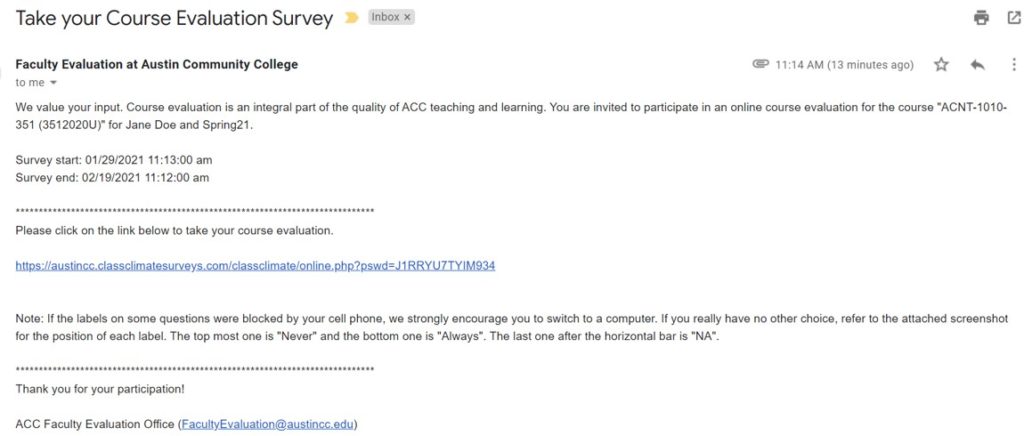
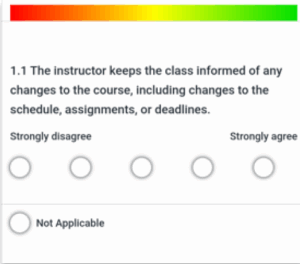
We also attach this screenshot in the system message to students in case students’ mobile phones block the labels. The position of the labels on the mobile phone are from left to right: 1–Strongly disagree, 2–Disagree, 3–Neither agree nor disagree, 4–Agree, and 5–Strongly agree.
The Faculty Evaluation Office hours are from 8 a.m. – 5 p.m., Monday through Friday. If your students encounter any issues with their course evaluations, please have them contact the office before 4 p.m. on the evaluation closing date. Any message sent after that will be answered the following business day.
Accessing course evaluations: Faculty
While course evaluations are open to submission by students, the faculty can only see the response rates. No results are available during the time that the course evaluation is open to students.
Results will be available 20 days after the evaluations are closed.
Course evaluation survey results are available 20 days after the course evaluation survey closes. You will receive a system email with the report for each course. The subject line will read ‘ACC Student Course Evaluation Results for [Semester] [Academic Year]’ (for example: ACC Student Course Evaluation Results for Fall 2025).
Another option to view/download them is to log into any Blackboard course and use the link “Course Evaluation” in the left navigation to open the Course Evaluation Panel: “My Survey Dashboard.”
The dashboard looks like this:
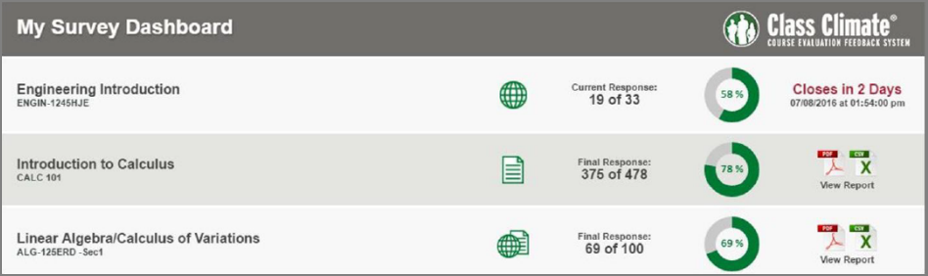
The course evaluation survey results open 20 days after the course evaluation survey has closed. After the 20 days, you will receive the reports via system email or in the “Course Evaluation” link in Blackboard. The 20-day delay is to accommodate the last week of the course and the grade submission.
To access course evaluation results, please log into Blackboard and use the “Course Evaluation” panel link. The panel will show results for all of your course evaluations.

This is caused by duplicate accounts in the system (if faculty teach in different areas of study).
Please contact facultyevaluation@austincc.edu. Staff from the Office of Faculty Evaluation will help resolve this issue.
Note: The students’ view is not affected by this issue.
The “My Survey Dashboard” under the Course Evaluation link in Blackboard is programmed to display course evaluations for the previous semester to provide faculty time to view and download their results.
We have set the panel to display your reports for up to three semesters, starting from summer 2020.
Note: For the student view, no matter which course link they use, students will only see the available course evaluation surveys for the current term.
Please contact facultyevaluation@austincc.edu if you need reports prior to summer 2020.
By default, the “Course Evaluation” link is added to all courses in Blackboard. If for any reason you don’t see it, here’s a video tutorial showing you how to bring the link back. Here is a video showing how your students complete the course evaluations in Blackboard.
Customized reports are no longer used because they were set up about six years ago and the vendor is no longer providing support for them. Also, customized reporting is not compatible with most of the updates/new features in the system, such as the Blackboard panel and the automatic email dispatch.
The Office of Faculty Evaluation uses standard reports when making the course evaluation surveys available.
The system standard report was approved in December 2020. To see a sample report and how to view it, please visit the Course Evaluation Results page.
The reports you received from the system email or Blackboard panel are for each course. Please email facultyevaluation@austincc.edu to request a report of your overall course evaluation average by the course type. Our staff will manually email you a copy.
Currently, the Office of Faculty Evaluation uploads the following fields into each department chairs and deans’ Box folders per their standard process:
-
-
- Individual course reports (PDF) (Sample)
- Compilation reports per course type and instructor (PDF). For example, this sample compilation report contains the summary of the same instructor from his/her two lecture courses. Since ACC’s new course evaluations use updated modality categories, results from all sessions within the same category are combined in this report. At the top of the report, you will find the course modality grouping along with the total number of responses from all sessions in that group. Here’s the reference table of course modality and the surveys.
- A report of each course average (See sample Excel file, last column.)
- Grade distribution report – See Sample Grade Distribution Report
- No Response Report – See Sample No Response Report
-
The n<5 statement used to show on reports from the old distance learning surveys that live in Online Services. ACC stopped using these surveys in summer 2020, and all distance learning surveys have been moved to ClassClimate, the ACC course evaluation system, since then. The Faculty Evaluation Office no longer dispatches course evaluations from Online Services, and none of the ClassClimate reports include that statement.
The individual course reports contain only information from that course section (e.g., EDUC 1300, section 117). Here’s a sample course individual report for your reference.
The aggregated report, on the other hand, includes aggregated data for all of your courses of the same format. For example, Professor Doe teaches two clinical and three lab courses during the same semester. She will receive the following reports from the course evaluation system.
Clinical courses: one aggregated report for the two clinical courses and two individual course reports for the two clinical courses.
Lab courses: one aggregated report for the three lab courses and three individual course reports for the three lab courses.
Here’s a sample aggregated report for your reference.
In your individual course reports, you will find the standard deviation (dev) data displayed under the Global Index on the top and to the right of each survey question. The standard deviation (dev) under Global Index shows the overall spread of students’ feedback across the whole course.

Review the Global Index Explanation (PDF) document for additional information.
And the standard deviation (dev) next to each question shows the spread for each question. For example, compared to question 2.7, the standard deviation (dev) for question 2.9 reflects more divergent opinions from students.

Review the Explanation of Standard Deviation (PDF) document for additional information.
Deans & Department Chairs
Box is a secure file storage system managed by the ACC Information Technology (IT) department. It is a more secure version of Google Drive.
Visit the Box YouTube channel to learn more about the tool.
For issues with your account, please submit a TeamDynamix ticket.
Only deans, department chairs, and administrative assistants have access to department/AoS faculty evaluation folder(s) in Box. There is currently a hold on creating new Box accounts in the ACC portal. If you serve on an evaluation committee and need access to the reports, you may seek approval from your department chair and have the administrative assistants share them with you.
The course evaluation survey reports to deans and department chairs are distributed via Box around the second week of the new semester. Please visit the Academic Calendar for reference.
To access the course evaluation reports for your department/area, you must log in to the ACC Box portal.
If your document is a preset fillable PDF, Adobe Sign won’t be able to add the signature blocks on top of existing blocks for a fillable PDF. You need to use a plain PDF document or remove the fillable blocks first, and then add signatures.